
If the Mindstorm is not connecting to the computer try the following steps:
Part One: Getting it to talk to the computer:
- Launch the LEGO Mindstorms EV3 Home Edition software.
- Plug the EV3 brick into the computer
- Open Tools > Firmware Update in the software. This will open up a popup window
- On the EV3 brick hold the centre and right button then while holding them down, press the back button - this will prompt the EV3 to say "updating" on the screen.
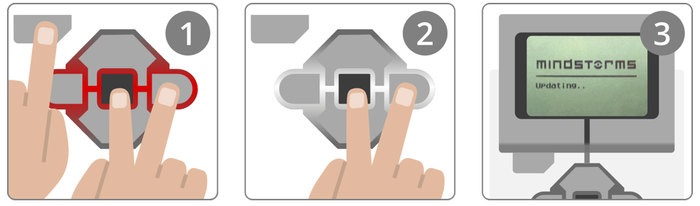
- On the popup window in the LEGO Mondstorms EV3 Home Edition software for the firmware update select the "Update Firmware" button even if you don't see that the brick is connected. Let the update run.
- When finished the EV3 will re-start.
- Disconnect the EV3.
- The EV3 brick will need to be re-started again for the computer to detect it. Plug it in to the computer.
- It should be detected both in Finder on the Mac and in the LEGO Mindstorms EV3 Home Edition software.
Part Two: Updating the firmware, again. - This step seems optional, but it does not seem to hurt.
- The LEGO Mindstorms EV3 Home Edition software does not have the latest firmware. I don't know why, but it doesn't.
- To get the latest version launch the LEGO Education webpage: https://ev3manager.education.lego.com/#
- Follow the onscreen instructions to update.